




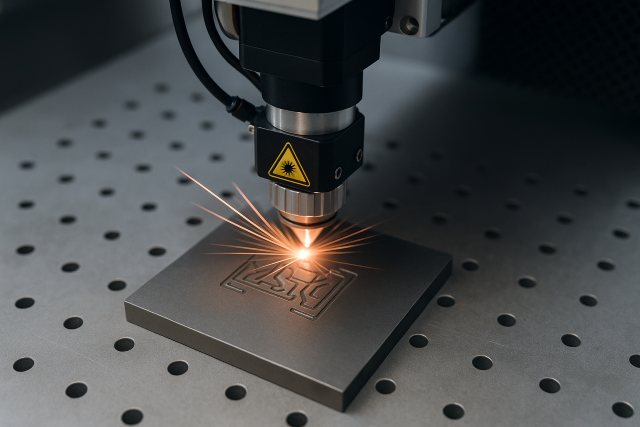
A laser engraving machine for metal has become one of the most powerful tools for creators, small businesses, and manufacturers seeking precision and customization. Within the first few minutes of using one, beginners are often surprised by how fast, clean, and permanent laser-engraved marks can be. Whether you’re starting a metal engraving business, customizing products at home, or adding engraving capabilities to an existing workshop, understanding the basics will save you time, money, and frustration.
This detailed guide covers everything beginners need to know — types of metal laser engravers, costs, safety, materials, workflow, real examples, FAQs, and expert insights — so you can make the right choice from day one.
What Is a Laser Engraving Machine for Metal?
A laser engraving machine for metal uses a high-powered, concentrated beam of light to vaporize or ablate the surface of metal, creating permanent marks. Unlike mechanical engraving, the laser never physically touches the material, which results in extreme accuracy, minimal wear, and finer details.
Modern systems can engrave text, barcodes, serial numbers, photos, deep cuts, textures, and pattern designs on metal with micrometer-level precision. According to Grand View Research, the laser processing market is expected to grow at over 8% CAGR through 2030, driven by manufacturing automation and consumer customization demand.
How Laser Engraving on Metal Works
Although the technology sounds complex, the process is simple once you understand the three steps:
- A digital design is imported into software like LightBurn or EzCad.
- The laser fires a concentrated beam onto the metal surface.
- Heat energy removes or darkens the top layer, creating a permanent mark.
Different machines use different wavelengths to interact with metals. Fiber lasers penetrate metal effectively, while diode and CO₂ lasers require special marking spray or coatings to achieve similar results.
Types of Laser Engraving Machines for Metal
Fiber Laser Engravers (Best for Metal)
Fiber lasers are the industry standard for metal engraving because of their strong absorption rate, long lifespan, and high speed. Their 1064 nm wavelength interacts perfectly with stainless steel, aluminum, brass, titanium, and even reflective metals.
Beginners prefer fiber lasers because they deliver professional results with minimal setup.
CO₂ Laser Engravers
CO₂ lasers don’t naturally engrave metal unless you apply a marking spray that chemically bonds with the surface during engraving. They are better suited for wood, acrylic, and plastic. If metal is your primary material, CO₂ is not recommended.
Diode Laser Engravers
Diode lasers can engrave coated metals and anodized aluminum but cannot directly engrave raw metals without special sprays. They are more affordable for hobbyists but slower and less precise than fiber lasers.
Which one should beginners choose?
If your main goal is metal engraving, the clear answer is a fiber laser engraving machine for metal. It offers:
- Higher precision
- Faster engraving speeds
- Long lifespan (up to 100,000 hours)
- Lower maintenance
- Better compatibility with all metal types
What Metals Can You Engrave?
A laser engraving machine for metal can process the following materials:
- Stainless steel
- Aluminum (raw, anodized, or coated)
- Silver
- Gold
- Brass
- Copper
- Titanium
- Tungsten
- Carbide
- Iron and steel alloys
Fiber lasers can also engrave reflective metals — something diode and CO₂ lasers struggle with.
Popular Uses of Metal Laser Engraving
Small Businesses & Etsy Shops
Entrepreneurs use fiber lasers for engraving YETI tumblers, custom knives, jewelry, nameplates, tags, logos, and wedding gifts. A single engraved tumbler can retail at a 300% markup.
Industrial Manufacturing
Factories rely on metal lasers to mark:
- Serial numbers
- Barcodes
- QR codes
- Part numbers
- Traceability marks
These markings are required in aerospace, automotive, and medical device industries.
Art & Craft
Artists use lasers to create detailed patterns, textures, and photo engravings on stainless steel or brass.
How to Choose the Best Laser Engraving Machine for Metal
Power Rating
For metal engraving, the typical fiber laser power ranges are:
- 20W – slow, good for light marking
- 30W – ideal entry-level for beginners
- 50W – great for deeper, darker engravings
- 100W+ – for industrial cutting and deep engraving
Beginners usually get the best balance with a 30W or 50W fiber laser.
Work Area Size
Common workspace sizes include 110×110mm, 150×150mm, and 200×200mm. Choose based on the size of your products.
Software Compatibility
Most fiber lasers use EzCad, while some brands support LightBurn, which is more beginner-friendly.
Cooling System
Fiber lasers use air cooling, making them maintenance-free.
Price
A good entry-level fiber laser engraving machine for metal ranges from $1,500–$4,000, depending on wattage and brand.
Safety Tips Every Beginner Should Know
Laser machines for metal require proper safety due to their high optical power. Keep in mind:
- Always wear certified laser safety glasses (1064 nm for fiber lasers).
- Avoid direct reflections from shiny metals.
- Use proper ventilation to remove fumes.
- Keep flammable materials away from the laser path.
- Never operate the machine unattended.
Following these practices ensures safe, long-term operation.
Step-by-Step: How to Engrave Metal for the First Time
Step 1: Prepare the Metal Surface
Clean the metal with alcohol to remove oil or dust. This ensures even engraving.
Step 2: Import Your Design
Use LightBurn or EzCad to import SVG, DXF, PNG, or vector artwork.
Step 3: Set the Laser Parameters
Adjust:
- Speed
- Power
- Line spacing
- Frequency
Beginners can use preset parameters from the manufacturer to start.
Step 4: Focus the Laser
Proper focus is essential for sharp engravings.
Step 5: Test on Scrap Metal
Never engrave a final product without testing your settings.
Step 6: Start the Engraving
Hit run and watch the laser burn precise marks onto the surface.
Common Questions Beginners Ask
Can a laser engraving machine for metal cut metal too?
Entry-level fiber lasers (20W–50W) engrave but cannot cut metal. A 100W+ fiber laser can mark and deep engrave, but cutting requires 500W–2000W CNC fiber cutting machines.
Is metal engraving profitable?
Yes. Custom metal engraving is one of the fastest-growing small business niches. Many users earn $3,000–$10,000 per month selling engraved tumblers, knives, and tags.
Does laser engraving fade over time?
No. Engraving removes surface material, making it permanent even in outdoor or high-wear conditions.
How long do fiber lasers last?
Most fiber lasers last 80,000–100,000 hours, meaning they can operate for years with little maintenance.
Best Practices to Get Professional Results
For crisp, high-quality engravings:
- Keep the lens clean.
- Use proper focus distance.
- Adjust frequency when engraving stainless steel for deeper contrast.
- Lower speed equals darker engravings.
- Perform routine test grids for each metal type.
Good settings and consistency can dramatically improve engraving quality.
Troubleshooting Beginner Problems
Faded or Light Engraving
Increase power, reduce speed, or refocus the laser.
Burn Marks or Overheating
Reduce power and increase speed.
Blurry Lines
Check if the lens or mirrors are dirty.
Uneven Engraving
Confirm the work surface is level and properly clamped.
Example Case Study: Starting a Metal Engraving Side Business
A new laser owner purchased a 30W fiber laser for $2,000 and started engraving stainless steel tumblers. Within the first month:
- Cost per tumbler: $7
- Sale price: $28
- Profit per tumbler: $21
- 100 tumblers sold in month one
- Monthly profit: $2,100
By diversifying into engraved knives, dog tags, and custom tags, they scaled to over $6,000 per month by month three.
The ROI potential is one of the biggest reasons people invest in a laser engraving machine for metal.
Conclusion
A laser engraving machine for metal is one of the most versatile and profitable tools for beginners entering the world of custom fabrication. With the right machine — ideally a 30W or 50W fiber laser — you can engrave stainless steel, aluminum, brass, titanium, and more with precision that mechanical tools simply cannot match. Whether you’re launching a small business, engraving gifts, or adding metal marking to your workshop, learning the basics covered in this guide will help you get started confidently and safely.
If you want help choosing the best machine, setting up presets, or writing a comparison guide, I can assist — just ask!